Overview
This article provides a comprehensive guide to updates for Tivian Communicate XI. It includes a downloadable PDF and visual representations of the update process, covering aspects such as the update schedule, types of updates, and how updates are implemented. The guide aims to inform users about the continuous improvement of the platform and ensure they are aware of the latest features and enhancements.
Information
What is a “Content Update”?
The update process is how Tivian keeps your plan information and branding up to date. It also
helps us make sure you’re getting the most out of all platform features and communications.
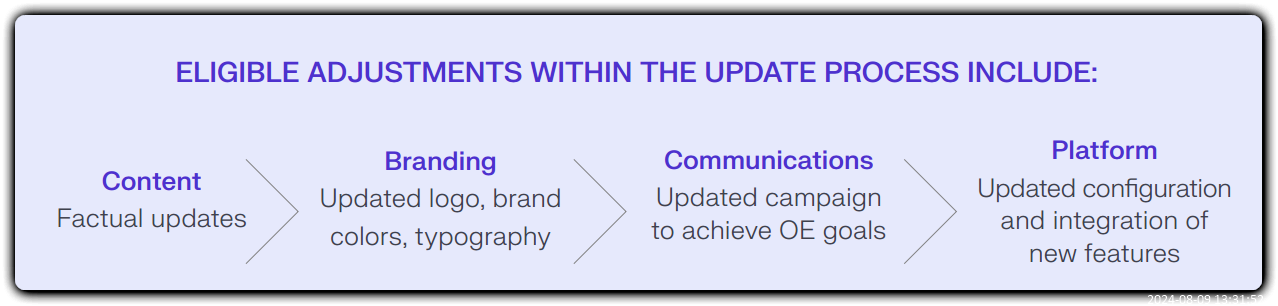
Commonly addressed changes during this process:
- Open Enrollment dates
- Plan options, plan costs, and deductibles
- Company contact information
- New company logos and colors
- Communication strategy and campaign timeline
- Technical integrations for API, HRIS, Slack, Microsoft
- Teams, automatic email delivery, etc.
- Platform permissions and configuration and the integration of new features
- Employee experience details, including CTA buttons, polls, and ratings
What do we need to begin updating your content?
- Finalized Open Enrollment dates
- Completed Update Form
- Finalized edits logged in the Proof review tool
If you’re undergoing a branding change:
- Your current branding guidelines document
- The HEX/RGB values of the new brand colors (as applicable)
- The updated logo in vector format (.ai or .eps, as applicable)
How long does the entire update process take?
10-11 weeks (from kickoff to delivery—includes communication, planning, trainings, and asset production
- If we have all the required information, you should receive the first draft of your updated content approximately 4 weeks from the date we receive your finalized edits and changes.
- Additional edits made during your content review will result in a longer production process. We recommend allocating 11 weeksfrom the time you meet your Tivian team representative to ensure content updates are completed in time and a communication plan can be developed.
- Content translations require an additional 2-3 weeks of production time once the English/primary asset has been updated. Significant changes to your plan offerings may also require longer development times to update your content.
Step 1
Submit your update form, including:
- Communication priorities.
- Information for specific journey assets that highlight your Open Enrollment dates and changes for the upcoming plan year.*
Step 2
Join a Kickoff Call with your Tivian team, where you’ll:
- Meet the team, and discuss your OE goals and metrics.
- Review new Communicate XI features, and configure your site.
- Discuss the general timeline, process, and next steps.
Step 3
- Complete your First Review of the updated Communicate XI experience, including the updated content and proposed communication items, if applicable.
- Start working with your Tivian team to set up your platform integrations, including API and automatic email delivery.
- Configure your account, so everyone who needs access to the platform is set up for success.
Step 4
- Complete your Second Review and approve updated communications and content.
- Finalize your communication items.
- Complete any required technical setup.
- Finalize your employee experience details, and test for launch readiness.
Step 5
- Your content is approved and communication items are finalized— you’re ready to launch!**
- Aim to send your first pre-OE communications.
* Premiums and contribution amounts may be submitted within 6-7 weeks before OE.
** Provided material-submission and review timelines have been met.
FAQ
Our team is already working on a plan. How will that work with Communicate XI?
We work with a number of customers who have internal or external communication partners. We recommend including them in the planning process as early as possible to determine how we can best collaborate on a comprehensive, integrated plan. Speak to your Tivian team representative to learn how we can best support your existing plans.
What can I do to reach more of my employees during this year’s Open Enrollment?
It’s best to get organized early, and create a plan for your OE communications. Reach out to your Tivian team at least 10-11 weeks prior to your OE start date, so we can tell you about all the new features of our platform and how to utilize reach methods like automatic email delivery, Slack, and Microsoft Teams.
Will we get to sign off on changes to the content?
Yes, the content update process ensures that all of your information is captured correctly and implemented accurately before the updated content is published.
However, additional, unexpected edits will result in a longer production timeline. We urge you to get all stakeholder and leadership feedback as early in the process as possible.
What types of edits can we request as part of the update process?
The update process is reserved for factual, communication, and branding changes. If you have needs beyond those requirements, reach out to your Tivian team representative to discuss options.
Priyanka Bhotika
Comments